Complete Agent Team Handbook + Agent Team Runner
Ogenta Agent Team Setup and Runner
Build an agent team with Ogenta: split work, share context, review teammates, and finish with evidence. Start with the meaning, choose a template, configure the team, then run a small agent team task.
- Default team
- Lead, Researcher, Builder, Reviewer
- Risk boundary
- Read-only first, approval before external actions
- Output
- Run payload, transcript, result, exportable setup
Definition
Runtime chooser
Template library
Setup builder
Runner transcript
Agent team meaning
An agent team is useful only when roles change the outcome.
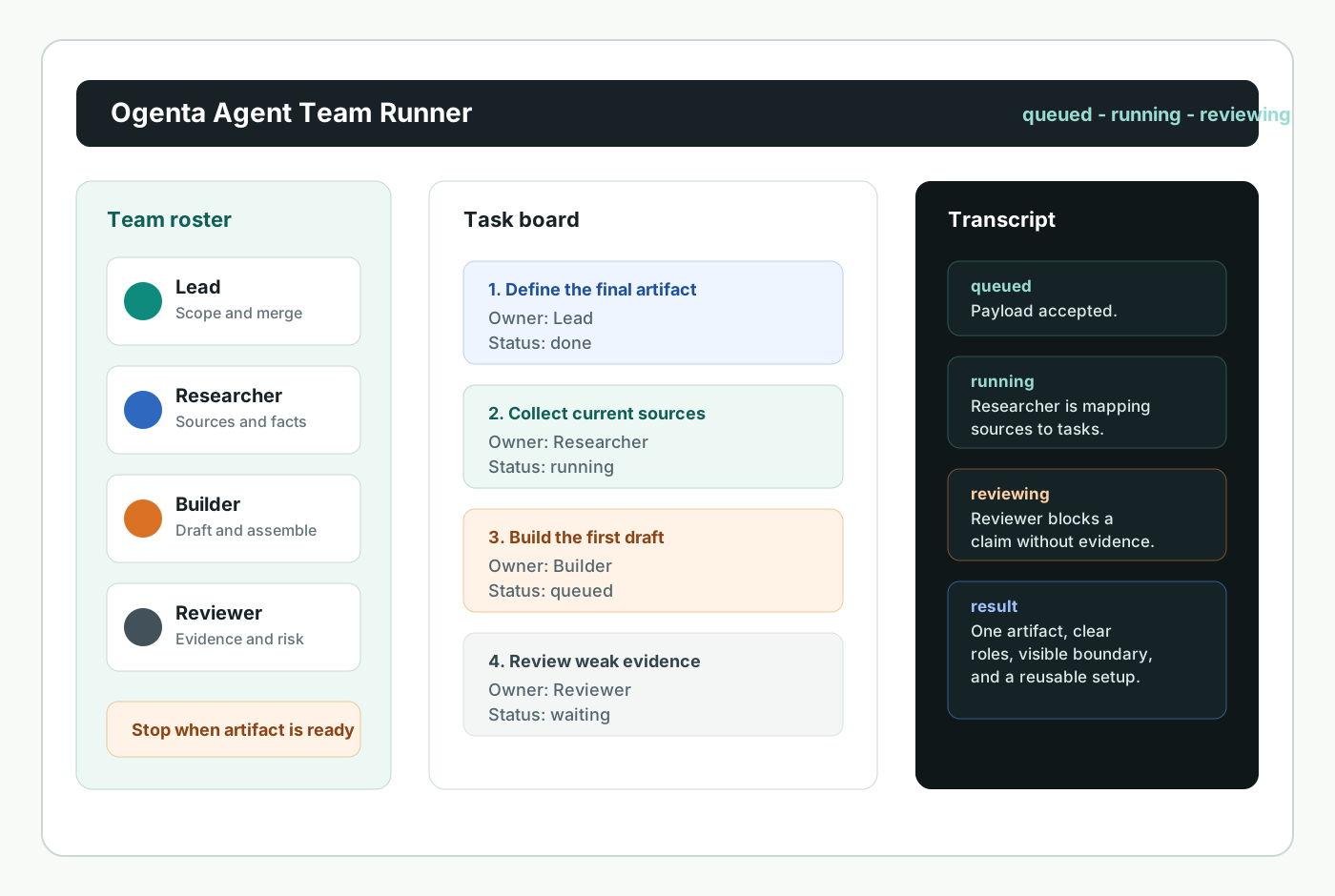
An agent team is a group of AI agents assigned to different roles so they can work on one goal with task ownership, communication rules, review points, and evidence. Ogenta treats the team as an operating pattern, not a pile of chatbots. A useful run has a lead who owns scope, teammates who own different parts of the work, a shared checklist, a permission boundary, and a stop condition that tells the team when the result is good enough to hand back.
The practical value is separation of concerns. A Researcher can collect current sources, a Builder can draft the artifact, a Reviewer can challenge unsupported claims, and the Lead can merge the judgment into one result. That costs more coordination than a single agent. It is worth it when the job has parallel research paths, conflicting assumptions, or a result that should be reviewed before someone acts on it. It is not worth it when one short, sequential instruction would be faster.
Runtime choice
Choose the coordination style before you choose more agents.
Different runtimes use the same team words for different mechanics. Claude Code agent teams are strongest when separate Claude Code sessions need a lead, shared tasks, and messaging. Grok Bot is better framed as a teammate workflow around messages, rosters, tools, browser use, shared context, approval requests, and transcripts. OpenAI's Agents SDK explains multi-agent orchestration as either LLM-led routing or deterministic code-led orchestration. Ogenta keeps those ideas separate so a template can be exported without pretending every platform works the same way.
Template library
Start from a team shape, not a blank prompt.
Every template includes a lead, teammates, allowed tools, the first task, a review gate, a stop condition, and failure modes. Copying only a nice prompt is too fragile. The permission boundary is part of the template.
Setup builder
Turn a goal into a runnable team payload.
Use the builder for a small first run. Keep the goal specific, name the final artifact, limit tools, and make the review gate visible before the team starts.
Runner console
Watch the run state and Execution transcript before trusting the result.
draft
validating
queued
waiting approval
running
reviewing
completed
failed
timed out
policy denied
quota exceeded
cancelled
Prepare a run to see the roster, permissions, payload, and next action.High-risk actions such as public posting or production deployment are routed to approval instead of being executed from a guest run. The default local runner creates status events, a transcript-ready result, artifacts, and a recovery link. A connected control plane can replace the local runner when a team needs longer work.
Saved team workspace
Save the setup, share a narrow review link, and revoke it when the review is done.
A useful team setup should outlive one browser session. Save the current payload after a run, open a read-only review link for the sections you choose, and keep the original run recoverable from its run id.
Runtime prompt blocks
Copy the right prompt block for the runtime you will use next.
The builder keeps the same goal, roles, tool boundary, review gate, and stop condition across runtime styles. Copy one block when you need a human-approved handoff outside the web runner.
Setup
Role Brief
Review
Handoff
Safety and recovery
The boring controls are what make a team reliable.
Agent teams fail when nobody owns the merge, every role sees every tool, or the review gate is vague. Ogenta makes those boundaries visible: no run starts without a goal, artifact, team size, selected tools, risk level, and review rule. A retry creates a new attempt. A cancel preserves the transcript that already exists. A share link should show only the sections the owner allowed. That is slower than magic-language automation, but it is easier to audit and easier to trust.
API contract
The web runner and API use the same payload shape.
POST /api/agent-team-runs
Idempotency-Key: setup-run-001

{
  "goal": "Plan a launch brief for an agent team feature",
  "template": "product-launch",
  "runtime": "ogenta",
  "riskLevel": "medium",
  "teamSize": 4,
  "allowedTools": ["web_research", "local_files"],
  "finalArtifact": "Launch brief and review checklist"
}

GET /api/agent-team-runs/{runId}
GET /api/agent-team-runs/{runId}/events
GET /api/agent-team-runs/{runId}/artifacts/{artifactId}
POST /api/agent-team-runs/{runId}/cancel
POST /api/agent-team-runs/{runId}/retry
POST /api/saved-teams
PATCH /api/saved-teams/{savedTeamId}
POST /api/saved-teams/{savedTeamId}/share
POST /api/team-shares/{shareId}/revoke
Expected response: a run id, status, event stream URL, and recovery URL. The event stream supports Last-Event-ID so a client can continue after a refresh.
Approval response: high-risk guest requests return waiting approval or policy denied with a safe alternative.
Recovery response: retries keep the old attempt and append a new one, so the transcript does not lose evidence.
Scoped API keys: Bearer keys can be limited to runs:create, runs:read, teams:save, teams:read, teams:share, or read-only review access.
Access and limits
The public handbook, builder, and exports are free to use.
Ogenta keeps the first run low-friction: read the handbook, choose a template, prepare the payload, run a local transcript, save the setup, create a review link, copy the result, or export prompts without creating an account. High-risk actions such as public posting, production deploys, account changes, payment work, or destructive changes wait for approval instead of running from a guest session.
FAQ
Common decisions before the first run.
What makes an agent team different from subagents?
Subagents are usually called by one controlling agent for bounded subtasks. An agent team is useful when teammates need more explicit ownership, messaging, review, and a lead that merges work into one final result.
Should every project use a four-agent roster?
No. Four roles are a good default for work that needs research, building, and review. Use two roles for simple work, and move toward five or six only when the added role removes a real bottleneck.
What should the first team run do?
Run a small job with a visible artifact: a brief, a checklist, a test plan, a source map, or a draft. Avoid irreversible actions until the transcript proves the team follows the boundary you set.
Can I recover a run after refreshing the page?
Yes. Ogenta keeps a run id in the URL after a run starts. Open that recovery URL to reload status, attempts, events, usage, and artifacts without creating a duplicate run.